Reporting Architecture
Siebel Reporting Layers
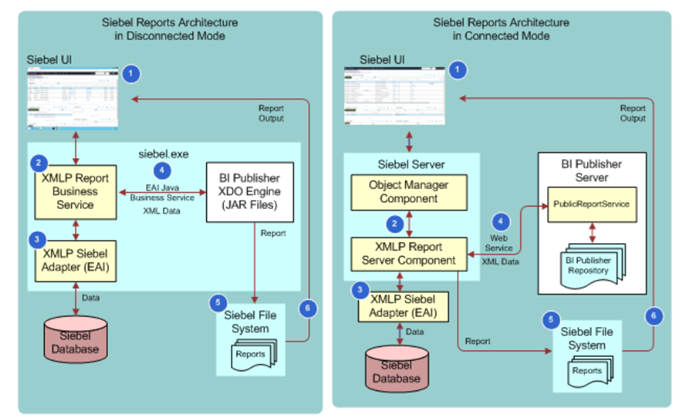
Architecture Components
1. Data Layer (Database)
- Tables: S_OPTY (Opportunities), S_SRV_REQ (Service Requests), S_CONTACT (Contacts)
- Views: Pre-joined tables for faster queries (e.g., S_OPTY_ACCOUNT_V combines opportunity + account data)
- Indexes: Optimize query performance on frequently filtered columns
2. Business Object Layer
- Business Components: Map to database tables (Opportunity BC → S_OPTY table)
- Calculated Fields: Weighted Revenue = Revenue × Probability (computed at runtime)
- Security: Row-level security filters (reps see only their accounts)
3. Report Object Layer
- Report Definitions: Stored in Siebel repository (.srf file)
- Data Sources: Which BCs provide data (e.g., "Opportunity Report" uses Opportunity BC)
- Filters: Default criteria (e.g., "Opportunities closed this quarter")
4. Presentation Layer
- Report UI: HTML rendering in browser
- Charts: JavaScript-based visualizations (Chart.js, D3.js)
- Export Formats: PDF, Excel, CSV generation
Report Execution Flow
Step-by-Step:
- User Action: Clicks "Run Report: Sales Pipeline"
- Report Server: Loads report definition from repository
- Query Builder: Translates report to SQL query
SELECT s.NAME, s.REVENUE, s.CLOSE_DT, s.SALES_STAGE FROM S_OPTY s WHERE s.CLOSE_DT >= '2024-01-01' AND s.SALES_STAGE != 'Closed Lost' ORDER BY s.REVENUE DESC - Database: Executes query, returns 500 rows
- Business Logic: Applies security (filter to user's territory), calculates weighted revenue
- Renderer: Formats as HTML table with sorting/paging
- Browser: Displays report to user
Report Types & Storage
Standard Reports (Pre-Built)
- Delivered by Oracle, stored in repository
- Examples: "Opportunity Pipeline", "Service Request Aging", "Campaign ROI"
- Can be customized (copy → modify → save as new report)
Custom Reports (User-Created)
- Built using Report Designer (Siebel Tools or Web Tools)
- Saved to repository or file system
- Can be shared with other users via access control
External Reports (BI Publisher)
- Created in Oracle BI Publisher
- Siebel data extracted → BI Publisher formats → Advanced layouts (pixel-perfect PDFs)
Integration Points
- Data Warehouse: Nightly ETL exports Siebel data → DW for historical analytics
- BI Tools: Tableau, Power BI connect to Siebel database (read-only) for advanced visualization
- Excel Add-In: Users query Siebel directly from Excel (refresh data on demand)